
Developing a section in Auckland: how to read the indicative check
Enter a site's frontage, depth and zone, and see what it could take. What the check measures, what it does not, and how to use it with your planner.
· 1 min read
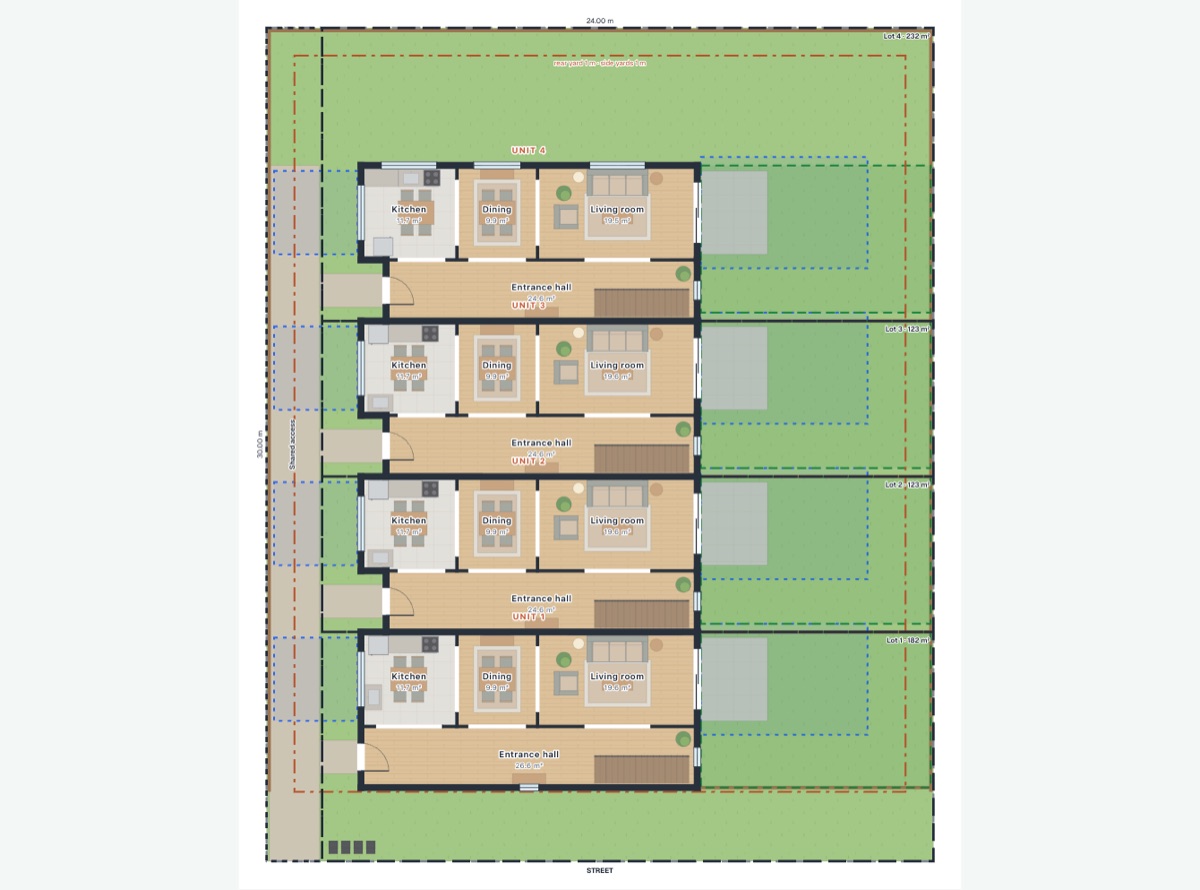
Develop a section answers a question that usually takes a feasibility study to start on: how many homes could this site take?
What you enter
- Frontage and depth, in metres.
- The zone, from the Auckland Unitary Plan's residential zones: Single House, Mixed Housing Suburban, Mixed Housing Urban, or Terrace Housing and Apartment Buildings.
- Optionally, a style for the homes, how many you want at most, and bedrooms in each.
What you get
AI Plan Creator lays the site out several ways and compares them:
- Density: as many compact two-storey townhouses as fit.
- Balanced: three bedrooms where the site allows, or one home fewer.
- Parking: townhouses with a car park each.
- Standalone houses: three to six detached two-storey houses, each with its own lot and car park, where they fit.
Each option comes with lots, access, yards and outdoor space drawn to scale, in plan and in 3D, and a report: the homes, the floor area, building coverage, landscaped area, and every standard the layout does not meet or would need a resource consent for.
The agent on the page
An agent on the page suggests what to try next, such as a car park for every home, and you can ask it in words: "Make it 22 by 41", "Only four homes". Every figure it gives comes from the layout itself, not from the AI.
What the check is, and is not
The rules are copied by hand from the Auckland Unitary Plan and are indicative. They are a clear starting point for a conversation with your planner or designer, not a planning assessment. Overlays, precincts, infrastructure, covenants and current council rules are not checked: confirm the zone and the rules that apply to your site with Auckland Council before you rely on any result.