

Landscaping ideas for New Zealand gardens: backyards, front yards and small sections, tried on a plan first
Practical landscaping ideas for New Zealand backyards, front yards and small sections, low maintenance and on a budget, each tried on a plan before you dig.
· 6 min read
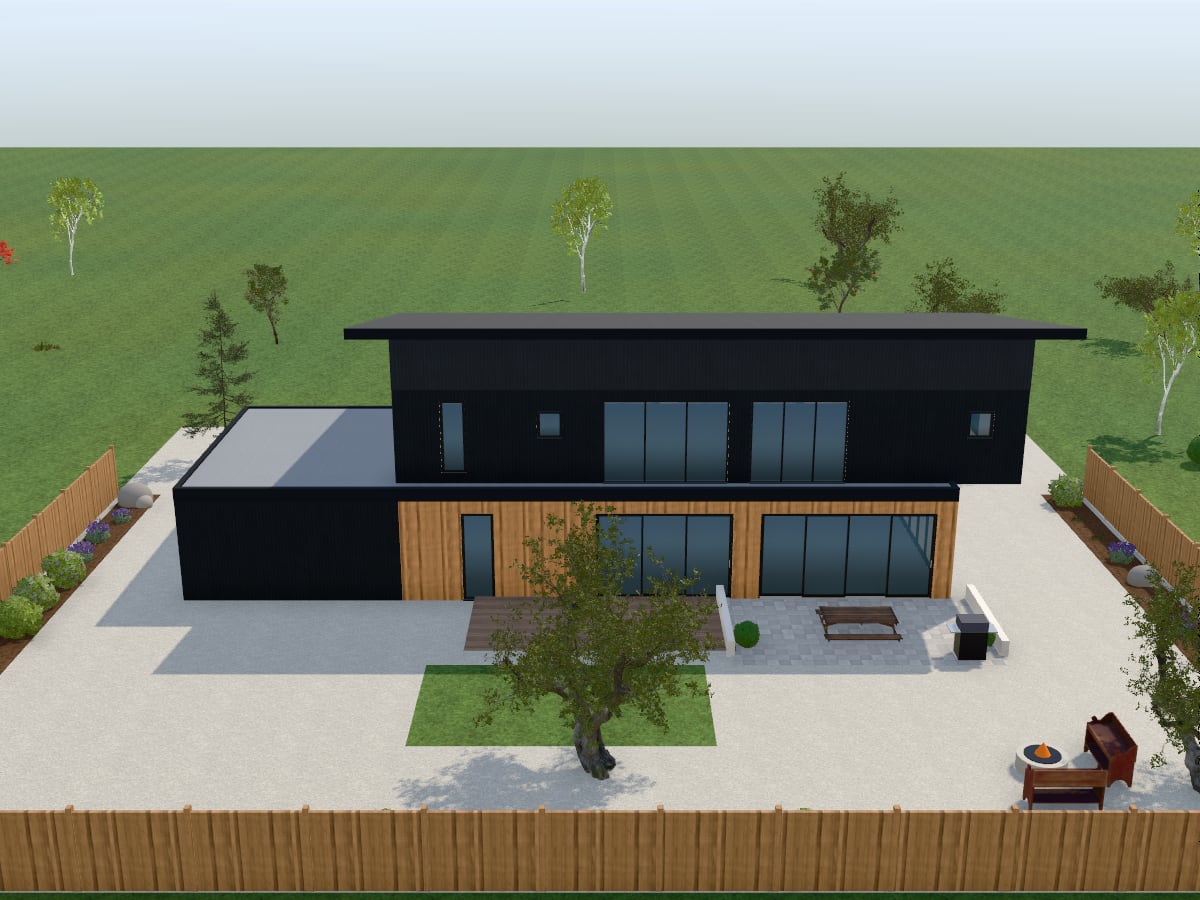
Good landscaping starts with how you want to use the garden, long before the plants. The ideas below are for New Zealand sections, front and back, large and small, each with a way to try it on a plan in AI Plan Creator before you dig. Plants vary from region to region, so the plant advice here stays general: for species, ask a local garden centre or landscaper.
Start with how you will use it
Write down what the garden has to do. Eating outside? Room for children to play? Vegetables? Parking, privacy, little upkeep?
Try it on a plan. Open a design in the editor, one of your own or one from the store, set the plot's width and depth under Plot, choose a garden style and press Landscape the garden. The plot is laid out at once: lawn, gravel or sand as the ground, a path to the front door, a driveway to the garage where there is one, a patio or deck by the garden door, planting beds along the boundary, trees and the style's features. It replaces the garden that was there and uses no AI request, so try as many styles as you like.
Backyard landscaping ideas
Put outdoor living where the sun is. In New Zealand the midday sun is in the northern sky, so the side of the house that faces north is usually the sunniest place to sit. Watch your own section through a day, in winter too: neighbours, trees and fences change it. The generator puts the patio or deck behind the house by the garden door; if your sun is elsewhere, drag it on the plan or draw another with the Garden surface tool. The 3D view's sun always stands on the street side of the plot: it does not know which way your section faces.
Choose a deck or a paved patio. The zen, tropical and family styles lay a timber deck; modern, cottage, mediterranean, native and desert a paved patio. Either way an outdoor dining table is set on it, with a barbecue where the patio is wide enough, and a pergola over the table in the mediterranean style or when you ask the agent for one.
Make a place round a fire. A fire pit is set on a square of gravel with two benches beside it. The modern, native and desert styles have one as standard.
Leave room to play. The family style is a big open lawn with a shade tree, a deck for meals, raised vegetable beds and a swing set.
Grow some food. Raised vegetable beds come with the cottage and family styles, and the agent will add them to any style. Put them in the sun.
Think hard about a pool. The generator fits the largest pool it can, from 7.5 by 4 m down to 4.5 by 2.8 m, with paving round it, and leaves it out when the plot has no room. A pool needs a safety barrier and ongoing care: ask your council what applies before you plan around one.
Front yard landscaping ideas
A clear path to the door. The generator lays a path 1.3 m wide from the front door to the street, with path lights along it.
A driveway that reaches the garage. It runs from the garage door to the street, 3.2 m wide, or wider for a double garage.
Low planting against the house. Beds go along the front of the house on either side of the path and the drive. In the desert style the front planting is kept low, so that the house is seen over it.
A boundary that suits the street. Draw a hedge, a timber fence, a wall or a picket fence with the Fence or hedge tool, and look at each from the street in 3D. Councils can limit how high a front fence may be, so check before you build one.
Try it on a photo of your own front yard. In the photo studio, upload a photo of the garden, choose Garden and pick one of the eight garden styles. The AI redesigns the planting, lawn, paving, paths and outdoor furniture, and is told to keep the house, fences, boundaries and camera angle. Building front does the house itself: cladding, colours, roof finish, entrance and front planting. Each picture uses one AI image, and the Free plan has 2 a month. Redesign my room from a photo explains what the photo studio can and cannot do.
Low maintenance garden ideas
Less lawn. A lawn needs mowing; gravel and mulch do not, though they need weeding now and then. The zen, mediterranean, native and desert styles lay gravel or decomposed granite as the ground instead of lawn. The native style keeps a small panel of lawn in the back garden, and the agent will add one to any of the four if you ask.
Tougher plants, fewer kinds. Plants that suit your local conditions generally need less looking after, and drought-tolerant ones less watering once they are established; natives are worth asking about. The native style is drought-tolerant grasses and shrubs with gravel mulch and a small lawn: the name describes the look, not a list of New Zealand natives. A garden centre can tell you which plants suit your soil, rainfall and wind.
A fence instead of a hedge. A hedge needs trimming; a timber fence or a wall does not. Try both with the Fence or hedge tool.
Catch the rain. The catalogue's Grounds has a rainwater tank 2.2 m across: drop it beside the house to see where one would fit.
Small gardens and tight budgets
Plan before you spend. Drawing costs nothing: the Free plan includes every design tool of the editor, and Landscape the garden uses no AI request.
Keep the middle open. The generator plants beds along the boundary and leaves the middle to lawn, gravel or paving, which makes a small section feel larger.
Make one space do two jobs. One paved area can be dining room, barbecue and play space.
Build in stages. Lay the paths and the patio first, plant later, and add features as the budget allows.
Use planter boxes. The catalogue has planter boxes and plants to set out on a courtyard or a deck.
Try ideas by asking
The AI agent takes requests in your own words: "a family garden with a pool and no swing set", "add raised vegetable beds and a fire pit". It lays out the garden in one of the eight styles with the features you name added or left out, for one AI request. The style decides the ground: a lawn style keeps its lawn, so for a garden without one choose zen, mediterranean or desert, or change the surface by hand. Design a garden by asking lists the styles and the twelve features. Or draw it all yourself: the Garden surface tool lays lawn, patio, deck, path, driveway, pool, planting bed, gravel or sand wherever you want it.
Before you dig
- The plants show size and place, not species. The catalogue's plants stand in for kinds of planting, such as a shrub, an ornamental grass, lavender, a fruit tree or a Japanese maple. Use them to plan where planting goes and how much room it takes, then choose the species with a local garden centre or landscaper.
- The plan is for exploring ideas. It does not work out levels, drainage or retaining walls. Take it to a landscape designer or contractor to work those out, and ask your council about anything that may need a consent, such as a retaining wall, a high fence or a pool.
- Find out where the pipes and cables run before anyone digs.
More is on AI garden design, and the house and its rooms have AI house design and AI interior design. The prices of Premium and Pro, which add more AI requests and AI images, are on the pricing page.