AI Plan Creator

Photo studio

AI room redesign from a photo, in the photo studio

Upload a photo of a room, a garden or the front of a building, choose what the AI should do and a style, and compare the result with your photo on a before-and-after slider. The AI is asked to keep the room's walls, windows and camera angle where they are and to change what you asked for. Each picture uses one AI image from your plan's allowance.

  • Free to start
  • No card needed
  • Nothing to install
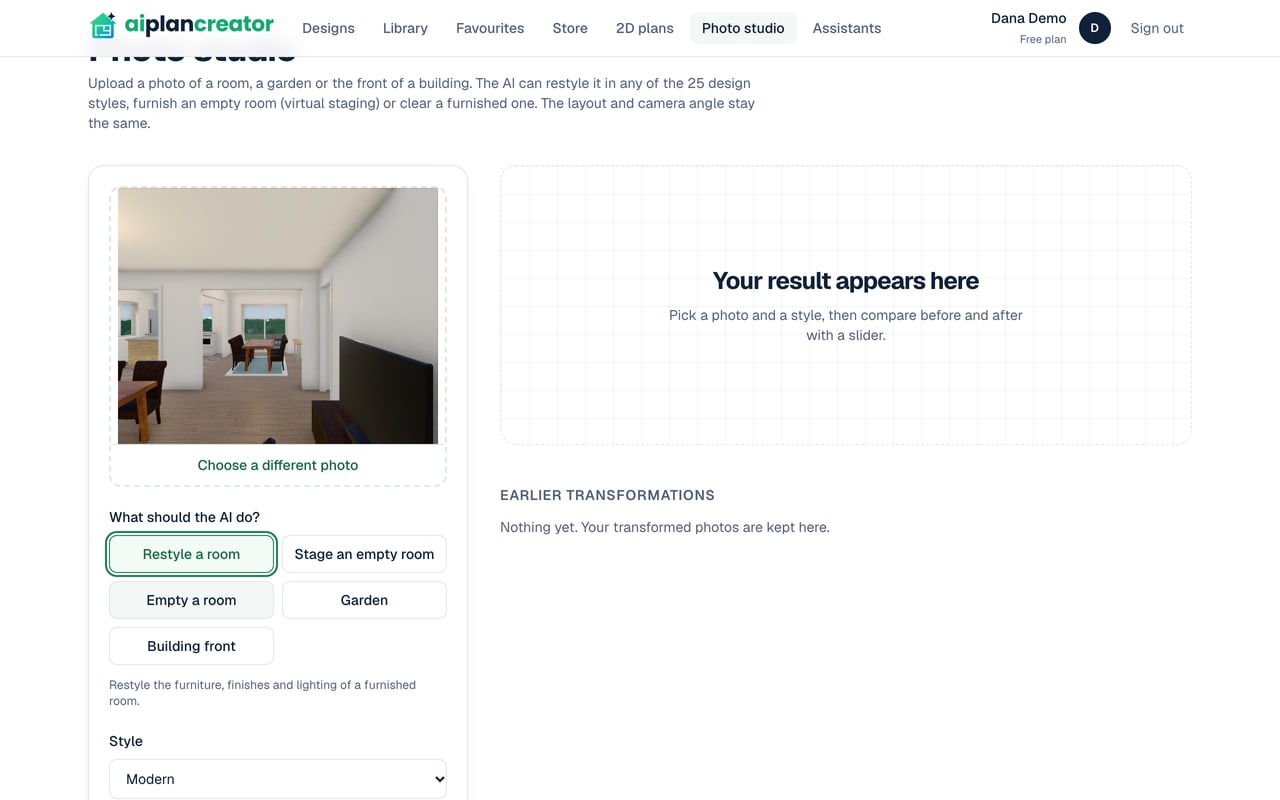
The photo studio on the Free plan: a view of a room from one of the app's designs chosen as the photo, Restyle a room selected among the five kinds, the style Modern, and Your result appears here where the result will be shown

How it works

4 steps from a photo to a redesigned room

  1. 1

    Upload a photo

    A JPEG, PNG or WebP photo of a room, a garden or a building's front, up to 10 MB, dropped in or chosen from your files.

  2. 2

    Choose what to do

    Restyle a room, Stage an empty room, Empty a room, Garden or Building front.

  3. 3

    Pick a style

    One of 25 design styles for a room or a building's front, or one of eight garden styles for a garden, with extra wishes of your own if you like.

  4. 4

    Compare and download

    Drag the slider between before and after, download the picture, and find it again under Earlier transformations.

Five things the AI can do to a photo

Under What should the AI do?, choose one of five, and a hint below says what it changes. Each is a set of instructions to the image model: what to change, what to keep, and to make the result read as a real photograph in natural light, with no people and no writing in it.

  • Restyle a room: the AI is asked to replace or restyle the furniture, textiles, lighting and decor in the style you choose, and to keep the walls, windows, doors, ceiling and camera angle.
  • Stage an empty room: it is asked to add real furniture, rugs, lighting, art and plants to suit the room's size and use, without changing its floors, wall colours or fixed fittings.
  • Empty a room: it is asked to take out the furniture, rugs, decor and clutter and fill in what they hid, and to keep the floors, wall finishes, fixed lighting and built-in fittings.
  • Garden: it is asked to redesign the planting, lawn, paving, paths and outdoor furniture, and to keep the house, fences, boundaries and camera angle.
  • Building front: it is asked to update the cladding, colours, roof finish, entrance and front planting, and to keep the building's shape, storeys, window positions and camera angle.
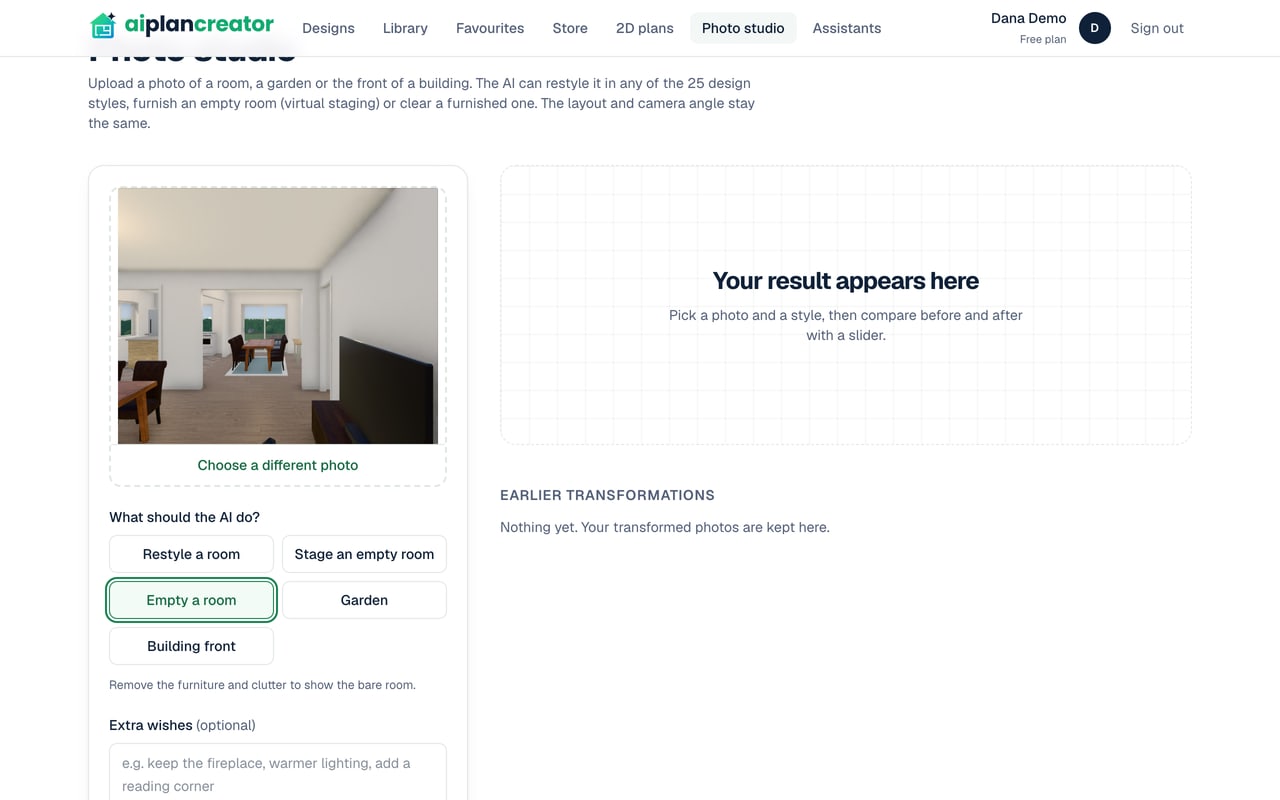
The photo studio on the Free plan with a view of a room from one of the app's designs chosen as the photo, Empty a room selected and its hint: Remove the furniture and clutter to show the bare room

Styles for rooms, gardens and building fronts

A room or a building's front can take any of the 25 design styles the editor uses, from Japandi and Coastal to New Zealand Contemporary and Modern Farmhouse, each described to the image model in words of its own. A garden takes one of eight garden styles, the garden generator's own: modern, cottage, zen, mediterranean, tropical, family, native and desert. Empty a room needs no style.

Extra wishes, of up to 600 characters, add what matters to you, such as keeping the fireplace, warmer lighting or a reading corner. They are passed to the AI as your preferences for the design, inside its instructions, never in place of them.


Before and after, side by side

When the picture comes back it is laid over your photo with a slider: drag it to see the room before and after in the same frame, then download the result. Your latest pictures are listed under Earlier transformations, each with what was asked for, to open and compare again. A picture can take a minute.

Your photo and each result are kept in your account. The photo is sent to Google's Gemini image model to be changed, as the privacy policy says. Use photos you have the right to use, and check each result against the real place before you show it to anyone.

What the photo studio costs

The photo studio is on every plan. Each picture it makes is one AI image from your plan's allowance, which is smaller on the Free plan, counted from the 1st of each month; on the Free plan a picture also uses some of the day's AI credits, which come back at midnight UTC. Only a picture that comes back is counted, and what is left is shown under the button.

For a design you are planning rather than a room that exists, the 3D view's AI render turns a view of the model into a photoreal picture for one AI image, and Photo traces the view with real light in your browser for none. To furnish the plan itself, stage its rooms in the editor, which uses no AI request.

Questions and answers

Good to know

For anything else, see the questions on the home page or send us a message.

Can AI redesign a room from a photo?

Yes. Upload a photo to the photo studio, choose Restyle a room and a style, and the AI replaces or restyles the furniture, textiles, lighting and decor, asked to keep the walls, windows, doors, ceiling and camera angle. Compare the result with your photo on the before-and-after slider.

What photos can I upload?

A JPEG, PNG or WebP picture of up to 10 MB, of a room, a garden or the front of a building. The file is checked by what it contains, not by its name. Use photos you have the right to use.

Does the AI keep the room as it is?

It is told to keep the architecture exactly: the walls, windows, doors, ceiling and camera angle. An AI image model can still change a detail, such as the shape of a window or a light fitting, so check each picture against the room before you use it.

Is the photo studio free?

It is on every plan, the Free plan included, which costs nothing and needs no card. Each picture uses one AI image, and the Free plan has a smaller allowance of them than the paid plans.

Can I build from a redesigned photo?

No. A redesigned photo is an AI picture for exploring ideas, not a drawing: its sizes are not measured and its details may differ from the room. To take a design further, draw it in the editor, whose drawings are for design exploration and are not construction documents.

Design tools

More of what AI Plan Creator does

Redesign a room from a photo

Free to start, no card needed. Or begin from a ready-made design in the store and change anything you like.